
Preparing for a Trial and Requesting Disclosure
York Region Provincial Offences Act early resolution meetings, hearings and trials are conducted either online or in-person in Newmarket, Ontario. Learn about the court location, connecting to remote hearings, requesting disclosure for your trial and frequently asked questions.
Remote Hearing Information
How to connect to your remote hearing
1. Zoom App
Download the app through the Zoom website for a desktop application (Zoom Client for Meetings) or through the mobile device’s app store (Apple’s App Store or Android’s Google Play Store).
When ready to connect, use the ‘Join a Meeting’ button on the app which will bring the participant through the sign in process where they can enter the meeting ID and passcode.
2. Zoom website: https://zoom.us/
Visit the website, click ‘Join a Meeting’ and it will bring them through the sign in process where they can enter the meeting ID and passcode.
3. By calling locally (within the GTA) +1 647 374 4685
You will be prompted to enter the meeting ID and passcode to join the meeting
| Courtroom | Meeting ID | Passcode |
|---|---|---|
| A2 | 452 876 7408 | 616861 |
| A4 | 423 186 8249 | 572706 |
| A5 | 350 804 3673 | 110185 |
| A6 | 333 310 1947 | 554628 |
| A7 | 958 703 6933 | 274844 |
| Early Resolution | 266 348 0713 | 437121 |
Please read the Remote Hearing Code of Conduct
Attending a Trial In-person
Newmarket (4960)
17150 Yonge Street
Newmarket, ON L3Y 8V3
905-898-0425 or 1-877-331-3309
This video will inform you on how to locate your courtroom:
This video can help you navigate to the York Region building in Newmarket:
Requesting Disclosure
You have a right to obtain the officer’s notes and any other available evidence relevant to the charge against you, also known as disclosure, to help you prepare for your trial.
Once disclosure is available, the Prosecution Office will forward the disclosure to the email address you provided in the Disclosure Request Form.
For Early Resolution meetings with the Prosecutor, only the Officer's notes will be provided.
Please select an option that best represents you:
- I requested a Trial and have received my Notice of Trial date in the mail (you must have a trial date scheduled to request disclosure) OR
- I was involved in a motor vehicle accident and received a Part 1 Summons (Form 3 - Please wait at least two weeks after the offence date to request disclosure)
- I requested an Early Resolution meeting and have received an Early Resolution notice with date scheduled in the mail.
Request Part I Disclosure Online
Or, submit a Request for Disclosure in person, by mail or by email:
Email: @email
Please include your name, address, telephone number and ticket or summons number.
4. I received a Part III Summons (Form 104 or Form 106 - please wait at least four weeks after the offence date to request disclosure)
Request Part III Disclosure Online
Or, submit a Request for Disclosure in person, by mail or by email:
Email: @email
Please include your name, address, telephone number and ticket/summons number, driver's licence number and offence date.
Newmarket Prosecution Office (4960)
17150 Yonge Street
Newmarket, ON L3Y 8V3
Assistance and Accommodation Services
Court Accessibility Coordinators are responsible for responding to accommodation and accessibility needs to ensure people with all abilities have equitable access to justice. They will work with you to determine the type of assistance or accommodation you require.
To contact a Court Accessibility Coordinator, please call 1-877-331-3309 or email @email. Please provide as much advance notice as possible.
For court proceedings, the Justice of Peace may need to approve the use of some types of assistive devices and technologies as well as the role of a support person. The Court Accessibility Coordinator can provide information about how to make a request to a Justice of Peace.
Court staff and Court Accessibility Coordinators cannot provide legal advice, including advice on legal procedures to any member of the public or any party (including people with disabilities) in a legal proceeding.
Additional Information
Look up the Status of Tickets, Court Date and Fines
You can find where and when a trial is scheduled and fine information.
Check Status of Tickets and Fines
If you have received an offence notice, you will need the location code and offence number, to find the information.
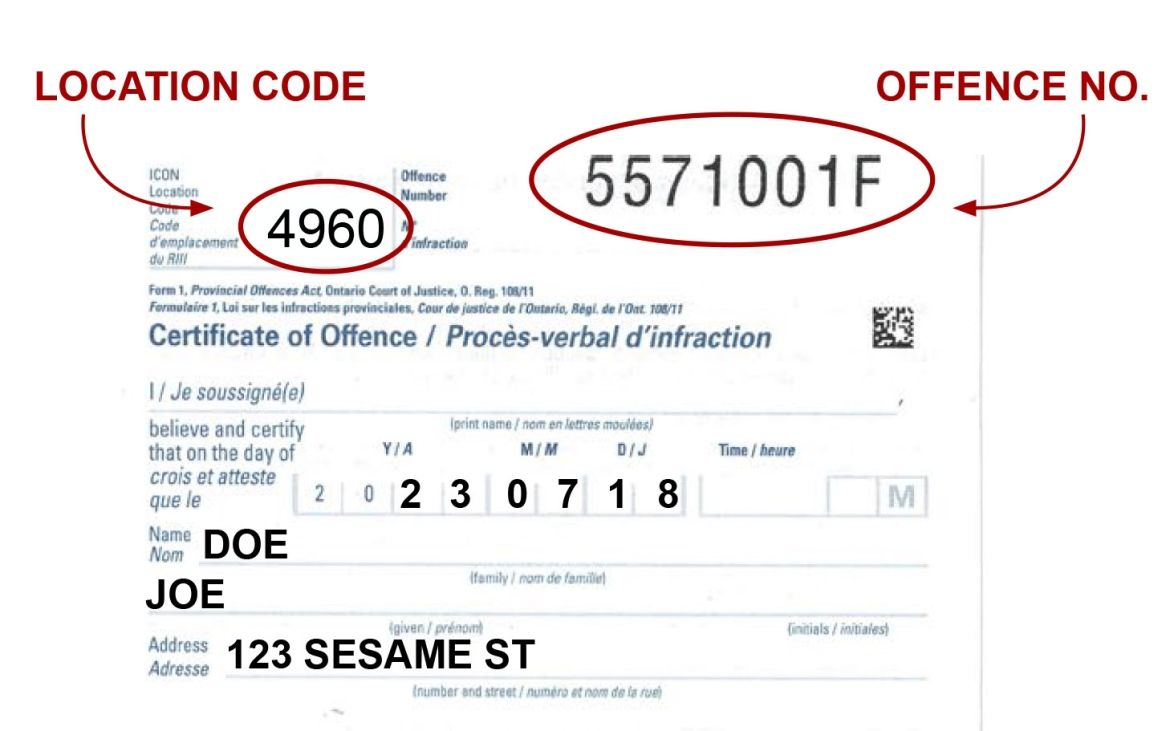
If you have received a Part I summons, you will find the offence number on the top right of your notice. If you have received a Part III summons, please call, email or visit the court office for the summons number.
If you do not have this information or you have lost your ticket, please contact the court office at 905-898-0425 or 1-877-331-3309 or by email @email
How to request a trial for an Offence Notice
If you believe you are not guilty of the charge noted on your traffic ticket, you may request a trial by signing your ticket under Option 3 on the second page or reverse side of your offence notice or ticket and filing it with the appropriate court.
For information on how to file a trial request please see Traffic Tickets. You have the right to request an English, French or bilingual trial. You may request an interpreter prior to your trial date.
What happens if I cannot attend, or I miss my trial?
You or your agent can call the court office shown on the trial notice well in advance of the trial date to ask about a Notice of Motion requesting a change of trial date. The court may grant or refuse your adjournment request.
If you cannot attend court on your trial date and you cannot bring a motion before the trial date as a result of a last-minute emergency, you may ask someone to attend the trial date in order to request a new trial date. The court may or may not grant a change of trial date.
If you miss your trial for a Part I or Part III charge, or you did not receive a Notice of Trial in the mail, it is your responsibility to contact the court administration office to follow up on your case or next court date. The Justice of the Peace may convict you in your absence. If you have your case number, you may check the status of your case online.
If you were initially given an Offence Notice (ticket) you can obtain a Record of Reopening Application within 15 days of becoming aware of the conviction. There are three ways to submit this form:
- Email to @email
- By Mail (please follow up with the court to ensure it has been received)
- In person
Newmarket – 4960
17150 Yonge St, Newmarket, ON L3Y 8V3
8:30 a.m. to 4:30 p.m.
The application will be reviewed by a Justice of the Peace who will consider the reasons for your failure to appear at trial. The re-opening may or may not be granted.
If you were served with a Summons (as opposed to an Offence Notice), the trial may take place in your absence, or a new trial date may be selected without further notice to you after which you may be convicted in your absence. Learn about Provincial Offences Appeals
Certified evidence for a prosecution case
The prosecution may present its case through certified evidence without having to call the officer as a witness. Certified evidence consists of the statements in the Certificate of Offence, certified photographs and certified ministry documents.
The admissibility of these offences is set out in the Highway Traffic Act and regulations. Section 48.1 of the Provincial Offences Act also allows for admissibility of Certified evidence for any Part I proceeding where a set fine exists for the offence.
How do I play a video disclosure (.zip file)?
Some digital evidence (video) is sent to defendants by email. If your digital evidence appears as a .ZIP file, it must first be downloaded and extracted before it can be viewed. View the Panasonic In-Car-Camera Videos Instructions for a step-by-step guide on how to extract the file.
Speed measuring device manuals
If you have been charged with speeding by a York Regional Police officer and a radar or laser device to obtain the speed reading was used, you can obtain a copy of the relevant manual for the device used by clicking on the link to the manual. The officer's notes will indicate what device the officer used.
DragonEye - Speed LIDAR
Decatur Electronics G3
Decatur Electronics Genesis - Genesis Handheld Directional GHD and Scout
Decatur Electronics Genesis - II Select
Decatur Electronics Genesis - VP Directional
LTI 20 / 20 TruSpeed Sxb
MPH Industries - BEE III
MPH Industries - Ranger EZ
MPH Industries - SpeedLaser LIDAR (Laser Atlanta)
If you have been charged with speeding by an Ontario Provincial Police officer and the officer used a radar or laser device to obtain the speed reading, you can obtain a copy of the relevant operating and testing sections of the manual for the device used by clicking on the link to the manual. The officer’s notes will indicate what device the officer used.
DragonEye - Speed LIDAR
Decatur Electronics Genesis - II Select
Decatur Electronics Genesis - VP Directional
Laser Ally - Speed LIDAR
Laser Atlanta - Speed Laser
If you have been charged with speeding by a CN Police officer and the officer used a radar or laser device to obtain the speed reading, you can obtain a copy of the relevant manual for the device used by clicking on the link to the manual. The officer's notes will indicate what device the officer used.
Stalker II MDR
Truspeed LTI 20-20
If you have been charged with speeding by an Automated Speed Enforcement Camera (ASE), you can obtain a copy of the relevant manual for the device used by clicking on the link to the manual.